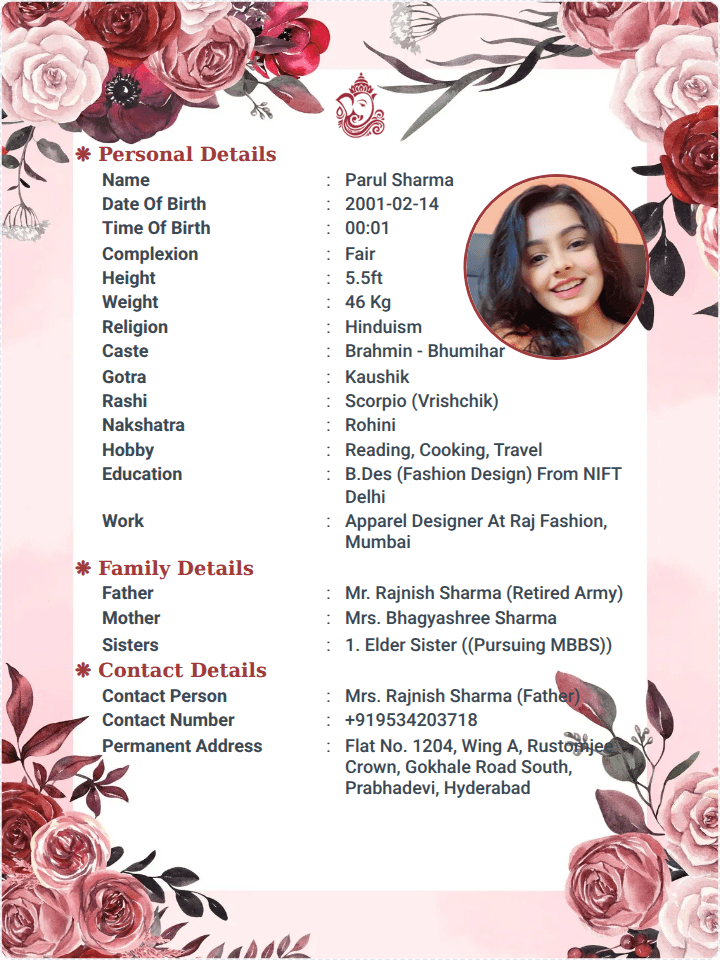
A Marriage Biodata Maker (or Biodata Creator) is a specialized digital tool designed to help individuals create a professional, aesthetically pleasing profile without the hassle of manual formatting in Word or Google Docs.
In a competitive matchmaking environment, the "look and feel" of your biodata is just as important as the information it contains. A dedicated creator ensures that your details are aligned, your photos are perfectly placed, and the final document is easy to share.
Why Use a Marriage Biodata Creator?
Using a dedicated tool like marriagebiodatacreator.com offers several advantages over traditional methods:
- Professional Templates: Access to layouts specifically designed for different cultures (Marathi, Muslim, Christian, etc.) and professions.
- Time-Saving: Instead of struggling with margins and fonts, you simply fill out a form, and the tool generates the layout for you.
- PDF Generation: Most creators allow you to download your biodata as a high-quality PDF, which ensures the formatting stays the same on every phone or computer.
- Photo Integration: These tools provide dedicated slots for portraits, ensuring your photos aren't stretched or pixelated.
Features to Look for in a Biodata Maker
When choosing a platform to build your profile, ensure it offers these key features:
- Customizable Fields: The ability to add or remove sections like "Horoscope," "Property Details," or "Business Vision" depending on your needs.
- Multilingual Support: Options to create your biodata in English, Marathi, Hindi, or other regional languages.
- Privacy Controls: Ensure the tool is secure and doesn't share your personal data publicly.
- Modern Designs: Look for templates that balance traditional motifs with clean, modern typography.
How to Use a Biodata Creator (Step-by-Step)
Step 1: Select a Template
Choose a design that reflects your personality. For example, a Businessman might choose a sleek, corporate-style layout, while a Marathi boy might choose a template with traditional Ganpati or Kalash icons.
Step 2: Fill in the Details
Input your information into the organized categories:
- Personal: Name, DOB, Height, Education.
- Family: Parents, Siblings, Native Place.
- Professional: Job Title, Company, Income.
- Religious/Cultural: Caste, Gotra, or Sect.
Step 3: Upload High-Quality Photos
A creator will usually prompt you for a "Profile Photo" (close-up) and a "Full-Length Photo." Make sure these are well-lit and professional.
Step 4: Preview and Edit
Check for any typos. Ensure the "Partner Expectations" section is clear and inviting.
Step 5: Download as PDF
Once satisfied, download the file. A PDF is the gold standard for sharing on WhatsApp or email because it prevents any accidental text edits by the receiver.
Summary Checklist for a Perfect Creator Result
- Clarity: Is the font size readable on a mobile screen?
- Brevity: Is the biodata limited to 1 or 2 pages? (1 page is ideal).
- Visual Appeal: Does the color scheme match the tone of the profile?
- Accessibility: Is the final file size small enough to be sent easily over messaging apps?
By using a tool like marriagebiodatacreator.com, you ensure that your first impression is polished, professional, and memorable, significantly increasing your chances of finding the right match.